Having a website is not enough.
If search engines cannot clearly understand what your page is about—or visitors cannot quickly find what they need—your website may struggle to rank, attract traffic, or convert that traffic into customers.
That is where on-page SEO comes in.
An effective on-page SEO checklist helps make sure every important page on your website is optimized for both search engines and real people.
From your page title and keywords to your headings, images, internal links, and calls to action, every element plays a role in helping Google understand your content and helping potential customers decide what to do next.
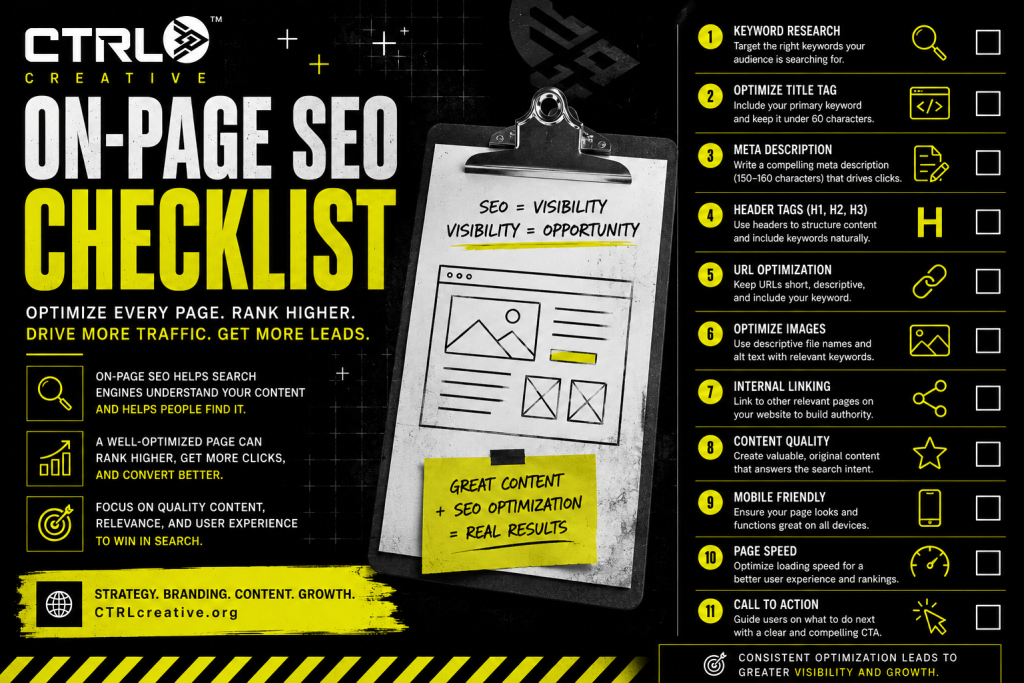
Here is a practical on-page SEO checklist you can use before publishing or updating any website page.
What Is On-Page SEO?
On-page SEO is the process of optimizing the content and elements directly on a webpage to improve its visibility in search engines.
This can include:
- Page titles
- Meta descriptions
- Keywords
- Headings
- Body copy
- URLs
- Internal links
- Images
- Alt text
- Page structure
- Search intent
- Calls to action
Unlike off-page SEO, which focuses on signals outside your website such as backlinks and mentions, on-page SEO is largely within your control.
That makes it one of the best places to start improving your website.
The Complete On-Page SEO Checklist
1. Choose One Primary Keyword
Every important page should have a clear primary topic.
Your primary keyword should represent the main search phrase you want the page to be associated with.
For example:
A marketing agency page might target:
Marketing agency Kansas City
A photographer might target:
Kansas City wedding photographer
A contractor might target:
Kitchen remodeling Overland Park
A blog article might target:
How to create a marketing plan
Choose one main keyword rather than trying to make one page rank for every service your business provides.
Focused pages are easier for both search engines and customers to understand.
2. Understand Search Intent
Before writing the page, ask:
What is the person searching this phrase actually looking for?
Search intent generally falls into categories such as:
- Informational
- Commercial
- Transactional
- Navigational
Someone searching:
What is local SEO?
is probably looking for information.
Someone searching:
SEO agency Kansas City
may be actively comparing providers.
Your page needs to match the intent behind the search.
Ranking for a keyword means very little if the content does not answer what the searcher actually wants.
3. Use the Primary Keyword in the SEO Title
Your SEO title is one of the strongest signals telling search engines what the page is about.
Include the primary keyword naturally.
For example:
On-Page SEO Checklist: How to Optimize Your Website | CTRL Creative
Keep your title clear and specific.
Avoid stuffing several unrelated keywords into one title.
Your title should make someone want to click while still clearly communicating the subject.
4. Write a Strong Meta Description
Your meta description summarizes the page for searchers.
While it is not simply a direct ranking shortcut, it can strongly influence whether someone chooses your result.
A strong meta description should explain:
- What the page offers
- Why it is useful
- What the reader will learn
For example:
Use this on-page SEO checklist to optimize your page titles, keywords, headings, images, links, content, URLs, and user experience for stronger search visibility.
Think of the meta description as the pitch underneath your search result.
5. Keep the URL Short and Descriptive
Your URL should clearly describe the page.
Good:
/on-page-seo-checklist/
Less effective:
/blog/post-46219-category-marketing-seo-checklist-final/
Use real words and avoid unnecessary numbers or characters.
Whenever possible, include your primary topic in the URL.
6. Use One Clear H1 Heading
The H1 is the primary headline on your webpage.
There should usually be one obvious H1 that tells visitors exactly what the page is about.
For this article:
On-Page SEO Checklist: How to Optimize Every Page on Your Website
Your H1 does not have to perfectly match your SEO title, but they should communicate the same core topic.
7. Organize Content With H2 and H3 Headings
Long blocks of text are difficult to scan.
Use headings to break content into logical sections.
For example:
H2: Optimize Your Page Title
Then:
H3: Where to Place Your Primary Keyword
A clean heading structure improves readability and helps search engines understand the hierarchy of the information.
8. Include Your Keyword Naturally in the Introduction
Mention the primary topic early.
Do not force it into every sentence.
For an article targeting on-page SEO checklist, including that phrase naturally near the beginning helps establish context immediately.
The key word is naturally.
Keyword stuffing makes content harder to read and can weaken the user experience.
9. Use Related Keywords and Topics
Search engines understand context.
Your page should naturally include related concepts that help thoroughly explain the topic.
For an on-page SEO article, related phrases might include:
- Search engine optimization
- SEO title
- Meta description
- Header tags
- Internal linking
- Keyword optimization
- Image alt text
- Search intent
- Website optimization
You do not need to repeat the exact same phrase twenty times.
Cover the subject comprehensively.
10. Write for Humans First
SEO content still has to be useful.
If someone clicks your website and finds awkward, repetitive content written only for search engines, they probably will not stay.
Good SEO writing should be:
- Clear
- Useful
- Specific
- Easy to scan
- Relevant
- Helpful
Answer the question thoroughly enough that the visitor does not immediately need to search elsewhere.
11. Add Internal Links
Internal links connect pages on your own website.
They can help visitors discover more useful content while also helping search engines understand how your pages relate to one another.
For example, this article could link to:
- Creating a Marketing Plan
- How to Generate Leads Without Paid Ads
- How to Create a Marketing Budget
- The Best Marketing KPIs to Track
- Your SEO services page
Use descriptive anchor text.
Instead of:
Click here
Try:
Learn how to create a marketing plan
That gives both users and search engines more context.
12. Link to Relevant External Sources When Useful
Sometimes a trustworthy external resource adds credibility or helps explain a topic.
External links are not required simply for the sake of having them.
Use them when they genuinely help the reader.
Your goal should always be to create the most useful resource possible.
13. Optimize Images
Large images can slow down a website.
Before uploading an image:
- Resize it appropriately
- Compress the file
- Use a suitable format
- Give the file a descriptive name
Instead of:
IMG_8837.jpg
Use something like:
on-page-seo-checklist.jpg
Image optimization improves both organization and performance.
14. Write Descriptive Image Alt Text
Alt text explains an image to users who may not be able to see it and gives search engines additional context.
Do not stuff keywords into alt text.
Describe the image accurately.
For example:
CTRL Creative on-page SEO checklist graphic showing website optimization elements
Alt text should primarily be useful and descriptive.
15. Improve Page Speed
People do not like waiting for websites.
Search engines do not want to recommend poor experiences either.
Common causes of slow pages include:
- Oversized images
- Too many plugins
- Heavy scripts
- Unoptimized video
- Poor hosting
- Excessive animations
A beautiful website that takes forever to load can lose customers before they ever see the design.
16. Make the Page Mobile-Friendly
A large portion of online traffic comes from mobile devices.
Review your page on a phone.
Check:
- Text size
- Navigation
- Buttons
- Forms
- Images
- Spacing
- Popups
Do not assume that because your page looks great on a desktop, it works equally well on mobile.
17. Add a Clear Call to Action
SEO brings people to the page.
Your website still needs to tell them what to do next.
Depending on the page, your call to action could be:
- Request a Quote
- Book a Consultation
- Schedule an Audit
- View Our Services
- Contact Us
- Download the Guide
- Subscribe
- Shop Now
Without a next step, traffic can become another vanity metric.
Search visibility should support business objectives.
18. Add Helpful FAQs
Frequently asked questions can strengthen a page by addressing concerns customers may still have.
For example:
How many keywords should one page target?
Focus on one primary topic while naturally supporting it with closely related keywords.
How long should an SEO page be?
There is no perfect universal word count. The page should be long enough to answer the searcher’s question thoroughly without adding unnecessary filler.
How often should on-page SEO be updated?
Review important pages periodically, especially when services, competitors, search behavior, or business information changes.
FAQs are especially useful when they reflect questions real customers actually ask.
19. Check for Duplicate Content
Each important page should serve a clear purpose.
If several pages contain almost identical copy, it can create confusion about which page should rank for a topic.
Avoid making five nearly identical service pages simply by changing the city name or swapping a few sentences.
Create pages that provide genuine value for each intended audience.
20. Review Keyword Cannibalization
Keyword cannibalization can happen when several pages compete for the same search intent.
For example, you might have:
/marketing-strategy//marketing-planning//small-business-marketing-strategy/
If all three pages essentially answer the same question, search engines may struggle to determine which page is most relevant.
Assign clear primary topics to your most important pages.
21. Make Your Content Easy to Read
Formatting matters.
Use:
- Short paragraphs
- Headings
- Lists
- Bold emphasis
- White space
- Clear language
Visitors often scan before they read.
Make the important information easy to find.
22. Demonstrate Experience and Credibility
People want to know why they should trust the information on your website.
Depending on the topic, you can strengthen credibility through:
- Examples
- Case studies
- Client results
- Author information
- Original insights
- Testimonials
- Firsthand experience
- Clear business information
Do more than rewrite what every other page already says.
Add your own expertise.
23. Check Every Link
Broken links create a poor experience.
Before publishing, check that:
- Internal links work
- External links work
- Buttons work
- Forms submit correctly
- Contact links go to the right destination
Something as small as a broken contact button can turn SEO traffic into lost revenue.
24. Review the Page From the Customer’s Perspective
Before you publish, forget about SEO for a moment.
Pretend you are the customer.
Ask:
Can I immediately tell what this page is about?
Did it answer my question?
Do I trust this business?
Can I easily find the next step?
Would I stay on this website?
This is one of the most overlooked parts of on-page SEO.
Search engines ultimately want to connect people with helpful experiences.
25. Measure What Happens After Publishing
Publishing is not the end.
Track performance.
Watch metrics such as:
- Organic traffic
- Search impressions
- Click-through rate
- Keyword visibility
- Conversions
- Leads
- Engagement
- Landing page performance
If a page receives impressions but few clicks, your title or description may need improvement.
If it gets traffic but no leads, the issue may be the offer, message, trust, or call to action.
SEO should be optimized based on what the data tells you.
Quick On-Page SEO Checklist
Before publishing, check:
- Primary keyword selected
- Search intent identified
- SEO title optimized
- Meta description written
- URL optimized
- One clear H1
- H2 and H3 structure
- Keyword used naturally
- Related topics covered
- Useful, original content
- Internal links added
- Images compressed
- Image filenames optimized
- Alt text added
- Mobile layout checked
- Page speed reviewed
- CTA included
- FAQs added where useful
- Duplicate content checked
- Links tested
- Page reviewed for readability
- Performance tracking established
On-Page SEO Is Where Visibility Meets Experience
Getting your website indexed is not the goal.
Getting found by the right person—and helping that person confidently take the next step—is.
Strong on-page SEO connects technical optimization with good marketing.
Your keyword attracts the right search.
Your headline earns attention.
Your content builds trust.
Your internal links create a journey.
Your call to action turns that journey into an opportunity.
At CTRL Creative, we help businesses build websites, content, SEO strategies, and marketing systems designed to do more than look polished.
They are built to be discovered.
Built to communicate.
And built to convert.
Because visibility without strategy is just traffic.
Control the Outcome.
Leave a Reply